
struts 2是通过commons fileupload文件上传。commons fileupload通过将http的数据保存到临时文件夹,然后struts使用fileupload拦截器将文件绑定到action的实例中。从而我们就能够以本地文件方式的操作浏览器上传的文件。
具体实现
前段时间apache发布了struts 2.0.6 ga,所以本文的实现是以该版本的struts作为框架的。以下是例子所依赖类包的列表: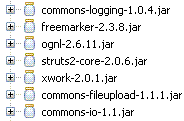
清单1 依赖类包的列表
首先,创建文件上传页面fileupload.jsp,内容如下:
<% @ page language = " java " contenttype = " text/html; charset=utf-8 " pageencoding = " utf-8 " %>
<% @ taglib prefix = " s " uri = " /struts-tags " %>
< html xmlns ="http://www.w3.org/1999/xhtml" >
< head >
< title > struts 2 file upload
< body >
< s:form action ="fileupload" method ="post" enctype ="multipart/form-data" >
< s:file name ="myfile" label ="image file" />
< s:textfield name ="caption" label ="caption" />
< s:submit />
在fileupload.jsp中,先将表单的提交方式设为post,然后将enctype设为multipart/form-data,这并没有什么特别之处。接下来,
其次是fileuploadaction.java代码:
 package tutorial; import java.io.bufferedinputstream; import java.io.bufferedoutputstream; import java.io.file; import java.io.fileinputstream; import java.io.fileoutputstream; import java.io.inputstream; import java.io.outputstream; import java.util.date; import org.apache.struts2.servletactioncontext; import com.opensymphony.xwork2.actionsupport;
 public class fileuploadaction extends actionsupport
  {
{ private static final long serialversionuid = 572146812454l ; private static final int buffer_size = 16 * 1024 ; private file myfile; private string contenttype; private string filename; private string imagefilename; private string caption;
 public void setmyfilecontenttype(string contenttype) { this .contenttype = contenttype;
 } public void setmyfilefilename(string filename) { this .filename = filename; } public void setmyfile(file myfile) { this .myfile = myfile; } public string getimagefilename() { return imagefilename; } public string getcaption() { return caption; } public void setcaption(string caption) { this .caption = caption; } private static void copy(file src, file dst) { try { inputstream in = null ; outputstream out = null ; try { in = new bufferedinputstream( new fileinputstream(src), buffer_size); out = new bufferedoutputstream( new fileoutputstream(dst), buffer_size); byte [] buffer = new byte [buffer_size]; while (in.read(buffer) > 0 ) { out.write(buffer); } } finally { if ( null != in) { in.close(); } if ( null != out) { out.close(); } } } catch (exception e) { e.printstacktrace(); } } private static string getextention(string filename) { int pos = filename.lastindexof( " . " ); return filename.substring(pos); } @override public string execute() { imagefilename = new date().gettime() + getextention(filename); file imagefile = new file(servletactioncontext.getservletcontext().getrealpath( " /uploadimages " ) + " / " + imagefilename); copy(myfile, imagefile); return success; }
  } 清单3 tutorial/fileuploadaction.java
 在fileuploadaction中我分别写了setmyfilecontenttype、setmyfilefilename、setmyfile和setcaption四个setter方法,后两者很容易明白,分别对应fileupload.jsp中的
fileuploadaction作用是将浏览器上传的文件拷贝到web应用程序的uploadimages文件夹下,新文件的名称是由系统时间与上传文件的后缀组成,该名称将被赋给imagefilename属性,以便上传成功的跳转页面使用。
下面我们就来看看上传成功的页面:
<% @ page language = " java " contenttype = " text/html; charset=utf-8 " pageencoding = " utf-8 " %><% @ taglib prefix = " s " uri = " /struts-tags " %>
< html xmlns ="http://www.w3.org/1999/xhtml" >
< head >
< title > struts 2 file upload
< body >
< div style ="padding: 3px; border: solid 1px #cccccc; text-align: center" >
< img src ='uploadimages/
< br />
< s:property value ="caption" />
清单4 showupload.jsp
showupload.jsp获得imagefilename,将其uploadimages组成url,从而将上传的图像显示出来。
然后是action的配置文件:
"-//apache software foundation//dtd struts configuration 2.0//en"
"http://struts.apache.org/dtds/struts-2.0.dtd" >
< struts >
< package name ="fileuploaddemo" extends ="struts-default" >
< action name ="fileupload" class ="tutorial.fileuploadaction" >
< interceptor-ref name ="fileuploadstack" />
< result name ="success" > /showupload.jsp
清单5 struts.xml
fileupload action显式地应用fileuploadstack的拦截器。
最后是web.xml配置文件:
< web-app id ="webapp_9" version ="2.4"
xmlns ="http://java.sun.com/xml/ns/j2ee"
xmlns:xsi ="http://www.w3.org/2001/xmlschema-instance"
xsi:schemalocation ="http://java.sun.com/xml/ns/j2ee http://java.sun.com/xml/ns/j2ee/web-app_2_4.xsd" >
< display-name > struts 2 fileupload
< filter >
< filter-name > struts-cleanup
< filter-class >
org.apache.struts2.dispatcher.actioncontextcleanup
< filter >
< filter-name > struts2
< filter-class >
org.apache.struts2.dispatcher.filterdispatcher
< filter-mapping >
< filter-name > struts-cleanup
< url-pattern > /*
< filter-mapping >
< filter-name > struts2
< url-pattern > /*
< welcome-file-list >
< welcome-file > index.html
清单6 web-inf/web.xml
发布运行应用程序,在浏览器地址栏中键入:http://localhost:8080/struts2_fileupload/fileupload.jsp,出现图示页面:
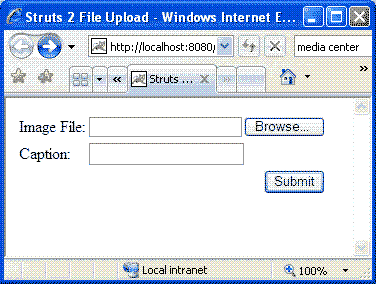
清单7 fileupload页面
选择图片文件,填写caption并按下submit按钮提交,出现图示页面:
清单8 上传成功页面
更多配置
在运行上述例子,如果您留心一点的话,应该会发现服务器控制台有如下输出:
mar 20 , 2007 4 : 08 : 43 pm org.apache.struts2.dispatcher.dispatcher getsavedirinfo: unable to find 'struts.multipart.savedir' property setting. defaulting to javax.servlet.context.tempdir
mar 20 , 2007 4 : 08 : 43 pm org.apache.struts2.interceptor.fileuploadinterceptor intercept
info: removing file myfile c:\program files\tomcat 5.5 \work\catalina\localhost\struts2_fileupload\upload_251447c2_1116e355841__7ff7_00000006.tmp 清单9 服务器控制台输出
上述信息告诉我们,struts.multipart.savedir没有配置。struts.multipart.savedir用于指定存放临时文件的文件夹,该配置写在struts.properties文件中。例如,如果在struts.properties文件加入如下代码:
struts.multipart.savedir = /tmp 清单10 struts配置这样上传的文件就会临时保存到你根目录下的tmp文件夹中(一般为c:\tmp),如果此文件夹不存在,struts 2会自动创建一个。
错误处理
上述例子实现的图片上传的功能,所以应该阻止用户上传非图片类型的文件。在struts 2中如何实现这点呢?其实这也很简单,对上述例子作如下修改即可。
首先修改fileupload.jsp,在
与然后修改struts.xml文件,将action fileupload的定义改为如下所示:
< action name ="fileupload" class ="tutorial.fileuploadaction" >< interceptor-ref name ="fileupload" >
< param name ="allowedtypes" >
image/bmp,image/png,image/gif,image/jpeg
< interceptor-ref name ="defaultstack" />
< result name ="input" > /fileupload.jsp
< result name ="success" > /showupload.jsp
清单11 修改后的配置文件
显而易见,起作用就是fileupload拦截器的allowtypes参数。另外,配置还引入defaultstack它会帮我们添加验证等功能,所以在出错之后会跳转到名称为“input”的结果,也即是fileupload.jsp。
发布运行应用程序,出错时,页面如下图所示:
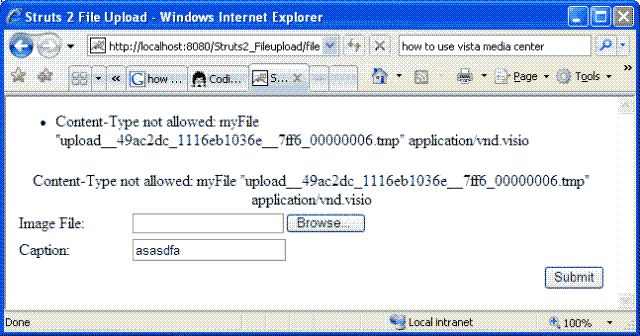
清单12 出错提示页面
上面的出错提示是struts 2默认的,大多数情况下,我们都需要自定义和国际化这些信息。通过在全局的国际资源文件中加入“struts.messages.error.content.type.not.allowed=the file you uploaded is not a image”,可以实现以上提及的需求。对此有疑问的朋友可以参考我之前的文章《在struts 2.0中国际化(i18n)您的应用程序》。
实现之后的出错页面如下图所示:
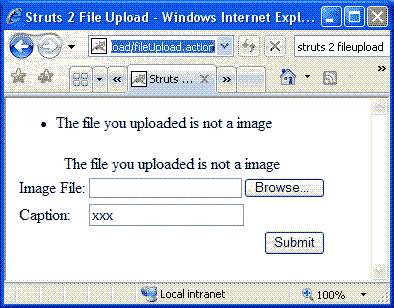
清单13 自定义出错提示页面
同样的做法,你可以使用参数“maximumsize”来限制上传文件的大小,它对应的字符资源名为:“struts.messages.error.file.too.large”。
字符资源“struts.messages.error.uploading”用提示一般的上传出错信息。
多文件上传
与单文件上传相似,struts 2实现多文件上传也很简单。你可以将多个
< s:file label ="file (1)" name ="upload" />
< s:file label ="file (2)" name ="upload" />
< s:file label ="file (3)" name ="upload" />
< s:submit />
清单14 多文件上传jsp代码片段
如果你希望绑定到数组,action的代码应类似:
private file[] uploads; private string[] uploadfilenames; private string[] uploadcontenttypes; public file[] getupload() { return this .uploads; } public void setupload(file[] upload) { this .uploads = upload; } public string[] getuploadfilename() { return this .uploadfilenames; } public void setuploadfilename(string[] uploadfilename) { this .uploadfilenames = uploadfilename; } public string[] getuploadcontenttype() { return this .uploadcontenttypes; } public void setuploadcontenttype(string[] uploadcontenttype) { this .uploadcontenttypes = uploadcontenttype; } 清单15 多文件上传数组绑定action代码片段 如果你想绑定到列表,则应类似:
private list < file > uploads = new arraylist < file > (); private list < string > uploadfilenames = new arraylist < string > (); private list < string > uploadcontenttypes = new arraylist < string > (); public list < file > getupload() { return this .uploads; } public void setupload(list < file > uploads) { this .uploads = uploads; } public list < string > getuploadfilename() { return this .uploadfilenames; } public void setuploadfilename(list < string > uploadfilenames) { this .uploadfilenames = uploadfilenames; } public list < string > getuploadcontenttype() { return this .uploadcontenttypes; } public void setuploadcontenttype(list < string > contenttypes) { this .uploadcontenttypes = contenttypes; } 清单16 多文件上传列表绑定action代码片段 总结
在struts 2中实现文件上传的确是轻而易举,您要做的只是使用

 闽公网安备 35060202000074号