
gamecanvas是canvas的子类,因此他同样继承了canvas类的一些特性,比如shownotify()方法会在canvas被显示在屏幕的时候调用,而hidenotify()会在canvas离开屏幕的时候被调用。我们可以把他们当作监听器来使用,用于初始化和销毁资源。比如
// when the canvas is shown, start a thread to
// run the game loop.
protected void shownotify()
{
random = new random();
thread = new thread(this);
thread.start();
}
// when the game canvas is hidden, stop the thread.
protected void hidenotify()
{
thread = null;
}
在游戏开发中最重要的就是接受用户触发的事件然后重新绘制屏幕,通常我们使用getkeystates()方法判断哪个键被按下了,然后绘制屏幕,调用flushgraphics()。在gamecanvas中,系统事实上已经为我们实现了双缓冲技术,因此每次我们绘制的时候就是在off-screen上绘制的。结束后通过flushgraphics把它复制到屏幕上去。下面是典型的接受事件、处理逻辑、绘制屏幕的代码。
// get the graphics object for the off-screen buffer
graphics g = getgraphics();
while (true) {
// check user input and update positions if necessary
int keystate = getkeystates();
if ((keystate & left_pressed) != 0) {
sprite.move(-1, 0);
}
else if ((keystate & right_pressed) != 0) {
sprite.move(1, 0);
}
// clear the background to white
g.setcolor(0xffffff);
g.fillrect(0,0,getwidth(), getheight());
// draw the sprite
sprite.paint(g);
// flush the off-screen buffer
flushgraphics();
}
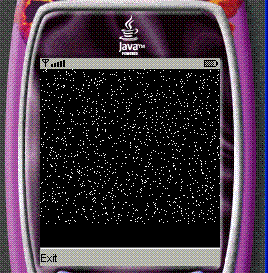
下面开始实现我们滚动星空的效果,其实设计的思想非常简单。我们启动一个线程,使用copyarea()方法把屏幕的内容往下复制一个像素的距离。然后绘画第一个空白的直线,随机的在直线上绘画点儿,这样看起来就像星空一样了。逻辑代码如下:
// the game loop.
public void run()
{
int w = getwidth();
int h = getheight() - 1;
while (thread == thread.currentthread())
{
// increment or decrement the scrolling interval
// based on key presses
int state = getkeystates();
if ((state & down_pressed) != 0)
{
sleeptime += sleep_increment;
if (sleeptime > sleep_max)
sleeptime = sleep_max;
} else if ((state & up_pressed) != 0)
{
sleeptime -= sleep_increment;
if (sleeptime < 0)
sleeptime = 0;
}
// repaint the screen by first scrolling the
// existing starfield down one and painting in
// new stars...
graphics.copyarea(0, 0, w, h, 0, 1, graphics.top | graphics.left);
graphics.setcolor(0, 0, 0);
graphics.drawline(0, 0, w, 0);
graphics.setcolor(255, 255, 255);
for (int i = 0; i < w; ++i)
{
int test = math.abs(random.nextint()) % 100;
if (test < 5)
{
graphics.drawline(i, 0, i, 0);
}
}
flushgraphics();
// now wait...
try
{
thread.currentthread().sleep(sleeptime);
} catch (interruptedexception e)
{
}
}
}
下面给出源代码
/*
* license
*
* copyright 1994-2004 sun microsystems, inc. all rights reserved.
*
*/
import javax.microedition.lcdui.*;
import javax.microedition.lcdui.game.*;
import javax.microedition.midlet.*;
public class gamecanvastest extends midlet implements commandlistener
{
private display display;
public static final command exitcommand = new command("exit", command.exit,
1);
public gamecanvastest()
{
}
public void commandaction(command c, displayable d)
{
if (c == exitcommand)
{
exitmidlet();
}
}
protected void destroyapp(boolean unconditional)
throws midletstatechangeexception
{
exitmidlet();
}
public void exitmidlet()
{
notifydestroyed();
}
public display getdisplay()
{
return display;
}
protected void initmidlet()
{
gamecanvas c = new starfield();
c.addcommand(exitcommand);
c.setcommandlistener(this);
getdisplay().setcurrent(c);
}
protected void pauseapp()
{
}
protected void startapp() throws midletstatechangeexception
{
if (display == null)
{
display = display.getdisplay(this);
initmidlet();
}
}
}
/*
* license
*
* copyright 1994-2004 sun microsystems, inc. all rights reserved.
*/
import java.util.random;
import javax.microedition.lcdui.*;
import javax.microedition.lcdui.game.gamecanvas;
// a simple example of a game canvas that displays
// a scrolling star field. use the up and down keys
// to speed up or slow down the rate of scrolling.
public class starfield extends gamecanvas implements runnable
{
private static final int sleep_increment = 10;
private static final int sleep_initial = 150;
private static final int sleep_max = 300;
private graphics graphics;
private random random;
private int sleeptime = sleep_initial;
private volatile thread thread;
public starfield()
{
super(true);
graphics = getgraphics();
graphics.setcolor(0, 0, 0);
graphics.fillrect(0, 0, getwidth(), getheight());
}
// the game loop.
public void run()
{
int w = getwidth();
int h = getheight() - 1;
while (thread == thread.currentthread())
{
// increment or decrement the scrolling interval
// based on key presses
int state = getkeystates();
if ((state & down_pressed) != 0)
{
sleeptime += sleep_increment;
if (sleeptime > sleep_max)
sleeptime = sleep_max;
} else if ((state & up_pressed) != 0)
{
sleeptime -= sleep_increment;
if (sleeptime < 0)
sleeptime = 0;
}
// repaint the screen by first scrolling the
// existing starfield down one and painting in
// new stars...
graphics.copyarea(0, 0, w, h, 0, 1, graphics.top | graphics.left);
graphics.setcolor(0, 0, 0);
graphics.drawline(0, 0, w, 0);
graphics.setcolor(255, 255, 255);
for (int i = 0; i < w; ++i)
{
int test = math.abs(random.nextint()) % 100;
if (test < 5)
{
graphics.drawline(i, 0, i, 0);
}
}
flushgraphics();
// now wait...
try
{
thread.sleep(sleeptime);
} catch (interruptedexception e)
{
}
}
}
// when the canvas is shown, start a thread to
// run the game loop.
protected void shownotify()
{
random = new random();
thread = new thread(this);
thread.start();
}
// when the game canvas is hidden, stop the thread.
protected void hidenotify()
{
thread = null;
}
}

 闽公网安备 35060202000074号