
原文地址:http://java.sun.com/developer/jdctechtips/2006/tt0211.html#2
日期:
uncaughtexceptionhandler名字意味着处理未捕获的异常。更明确的说,它处理未捕获的运行时异常。java编译器要求处理所有非运行时异常,否则程序不能编译通过。这里“处理”的是方法里throws子句声明的异常或在try-catch块里的catch子句的异常。
在下面的示例中,让我们关注两个异常:filenotfoundexception和arithmeticexception。如果使用一个不正确的string或file参数值来构造filereader时,将会抛出filenotfoundexception异常。当你调用这些构造函数时,编译器要求你处理每一个可能抛出异常的子句:
filereader input;
string filename = ...;
try {
input = new filereader(filename);
} catch (filenotfoundexception e) {
processmissingfile(filename, e);
}
我们再来比较一下,arithmeticexception是一个运行时异常。java编程语言规范(对于编译器而言)不要求处理运行时异常。因此在下面的循环中,从10到0都会被100除,而在最后一次循环中将抛出arithmeticexception异常:
for (int i=10; i >= 0; i--) {
int div = 100 / i;
}
exception in thread "main" java.lang.arithmeticexception: /
by zero
at test.main(test.java:4)
输出堆栈信息显示出缺省未捕获的异常内容。通常说来,这样的缺省行为已经足够了,不过有时也不行。设想你想在弹出式窗口输出堆栈信息,来替代在系统控制台输出该信息。如果你自己设置一个缺省的未捕获异常处理,你就可以得到这样的效果。
这里有三个最新的处理未捕获异常的方法。第一,你可以调用thread的setuncaughtexceptionhandler()方法。这个方法允许你在特殊的线程里定制行为。第二,你可以定义你自己的threadgroup并改变行为使每个线程都从这个组中创建并重写它们的uncaughtexception()方法。第三,你可以设置缺省行为让所有线程调用thread的静态方法setdefaultuncaughtexceptionhandler()。
thread的setuncaughtexceptionhandler()和setdefaultuncaughtexceptionhandler()方法都需要实现uncaughtexceptionhandler接口作为参数。该接口是thread类的内部接口,因此它的全名是thread.uncaughtexceptionhandler。该接口的唯一方法是:
void uncaughtexception(thread t, throwable e)
当你实现了uncaughtexception方法或实现了该接口或重写threadgroup的方法,你都可以定制其行为。在下面的示例中,我们实现了uncaughtexceptionhandler,无论运行时异常何时发生,堆栈信息都会显示在窗口的文本区域里。你可以在两个异常间关闭窗口。当下次异常发生时,窗口会再次出现在其他窗口之前。
import java.awt.*;
import java.io.*;
import javax.swing.*;
public class stackwindow extends jframe
implements thread.uncaughtexceptionhandler {
private jtextarea textarea;
public stackwindow(
string title, final int width, final int height) {
super(title);
setsize(width, height);
textarea = new jtextarea();
jscrollpane pane = new jscrollpane(textarea);
textarea.seteditable(false);
getcontentpane().add(pane);
}
public void uncaughtexception(thread t, throwable e) {
addstackinfo(e);
}
public void addstackinfo(final throwable t) {
eventqueue.invokelater(new runnable() {
public void run() {
// bring window to foreground
setvisible(true);
tofront();
// convert stack dump to string
stringwriter sw = new stringwriter();
printwriter out = new printwriter(sw);
t.printstacktrace(out);
// add string to end of text area
textarea.append(sw.tostring());
}
});
}
}
要测试这个处理,你需要一个程序来设置这个处理并抛出一些运行时异常。在下面的程序中,dumpteat将会这样做。为了简单,dumptest仅仅产生两个异常。如果要抛出更多的异常,你可以自由的在程序里添加更多的错误代码。程序在第一个异常显示后会暂停,你可以在异常间关闭异常堆栈窗口。
import java.io.*;
public class dumptest {
public static void main(final string args[])
throws exception {
thread.uncaughtexceptionhandler handler =
new stackwindow("show exception stack", 400, 200);
thread.setdefaultuncaughtexceptionhandler(handler);
new thread() {
public void run() {
system.out.println(1 / 0);
}
}.start();
bufferedreader br =
new bufferedreader(new inputstreamreader(system.in));
system.out.print("press enter for next exception");
br.readline();
new thread() {
public void run() {
system.out.println(args[0]);
}
}.start();
system.out.print("press enter to end");
br.readline();
system.exit(0);
}
}
编译stackwindow和dumptest。当你运行dumptest时,在控制台里会看见下面的内容:
> java dumptest
press enter for next exception
你将看见堆栈信息显示在窗口里的文本区域里。
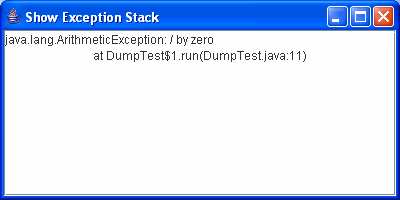
按下enter,在控制台里回看见下面的内容:
press enter to end
你可以在窗口的文本区里看见另一个堆栈信息。
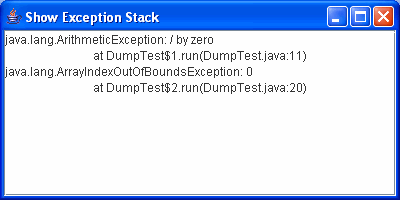
虽然你可以认为这些是处理未捕获的异常的所有方法,其实还有更多的方法。模式对话框要求有它自己的事件线程,因为它自己非捕获处理。系统属性sun.awt.exception.handler覆盖了所有容器,但不是好的文档。rfe(增强型请求)提交了可扩展的属性到正式的api中。
除best practices in exception handling外,2002年5月的技巧文章stacktraceelements也是一篇重要的参考。也可以看the java tutorial的handling errors using exception课程。

 闽公网安备 35060202000074号