
gamecanvas实际上就是屏幕上一个可绘制区域. javax.microedition.lcdui.game.gamecanvas 类与javax.microedition.lcdui.canvas 有以下两点不一样: 图像缓冲以及可以查询按键的状态. 这些改进给游戏开发者更多的便利.
图像缓冲实现了所有的图形对象在后台创建,等他们全部准备好了,再一起绘制到屏幕上去.这使得动画更加流畅.在代码里我已经说明了怎么调用 advance() 方法. ( advance()在 gamethread 对象的主循环中调用.) 你所要做的就是调用paint(getgraphics()) 然后调用 flushgraphics(). 为了让你的代码更加高效,并且你知道屏幕上哪些部分需要重新绘制,你可以调用 flushgraphics()方法.作为实验,把 paint(getgraphics()) 和 flushgraphics() 的调用换成 repaint()以及 servicerepaints()(如果你的类是继承自canvas而不是gamecanvas的话).在我的代码中中,他们没有什么明显的区别,但是如果你的程序包含了很多复杂的图形的话,gamecanvas 无疑是一个明智的选择.
当你学习下面的代码的时候,你会发现当我刷新了屏幕以后 (在advance()方法中),我让线程停止了1毫秒. 这除了是为了让新绘制的图像稍稍停留一会, 更重的是它保证了按键查询的正确工作. 我前面已经提到, gamecanvas 和canvas的按键状态的响应是不一样的. 在 canvas时代, 如果你想知道按键状态,你必须实现keypressed(int keycode),每当有键被按下时,这个方法就被调用. 而 gamecanvas时代, 当你想知道某个键是否被调用的时候,直接调用 getkeystates()方法就成了. 当然getkeystates()的返回值会在另外一个线程中被更新,所以在你的游戏主循环中我们最好稍微登上一会,以保证这个值被更新,磨刀不误砍柴功嘛。
gamecanvas的两个方面的优越性是怎么提高绘制性能以及按键响应这个问题现在已经显而易见了。 让我们再回到 gamethread 类, 游戏的主循环首先向 gamecanvas 的子类 (叫做jumpcanvas) 查询按键状态 (参见 jumpcanvas.checkkeys() 方法). 按键事件处理好了以后, gamethread 的主循环调用jumpcanvas.advance() 来让 layermanager 对图像做适当的更新 (下一节中将会详细介绍) 然后将它们绘制到屏幕上,最后等上一小会。
下面是 jumpcanvas.java的代码:
package net.frog_parrot.jump;
import javax.microedition.lcdui.*;
import javax.microedition.lcdui.game.*;
/**
* this class is the display of the game.
*
* @author carol hamer
*/
public class jumpcanvas extends javax.microedition.lcdui.game.gamecanvas {//---------------------------------------------------------
// dimension fields
// (constant after initialization)
/**
* the height of the green region below the ground.
*/
static int ground_height = 32;
/**
* a screen dimension.
*/
static int corner_x;
/**
* a screen dimension.
*/
static int corner_y;
/**
* a screen dimension.
*/
static int disp_width;
/**
* a screen dimension.
*/
static int disp_height;
/**
* a font dimension.
*/
static int font_height;
/**
* the default font.
*/
static font font;
/**
* a font dimension.
*/
static int score_width;
/**
* the width of the string that displays the time,
* saved for placement of time display.
*/
static int time_width;
//---------------------------------------------------------
// game object fields
/**
* a handle to the display.
*/
display mydisplay;
/**
* a handle to the midlet object (to keep track of buttons).
*/
jump myjump;
/**
* the layermanager that handles the game graphics.
*/
jumpmanager mymanager;
/**
* whether or not the game has ended.
*/
static boolean mygameover;
/**
* the player's score.
*/
int myscore = 0;
/**
* how many ticks we start with.
*/
int myinitialgameticks = 950;
/**
* this is saved to determine if the time string needs
* to be recomputed.
*/
int myoldgameticks = myinitialgameticks;
/**
* the number of game ticks that have passed.
*/
int mygameticks = myoldgameticks;
/**
* whether or not this has been painted once.
*/
boolean myinitialized;
/**
* the initial time string.
*/
static string myinitialstring = "1:00";
/**
* we save the time string to avoid recreating it
* unnecessarily.
*/
string mytimestring = myinitialstring;
//-----------------------------------------------------
// gets/sets
/**
* this is called when the game ends.
*/
static void setgameover() {mygameover = true;
gamethread.requeststop();
}
/**
* find out if the game has ended.
*/
static boolean getgameover() {return(mygameover);
}
//-----------------------------------------------------
// initialization and game state changes
/**
* constructor sets the data.
*/
public jumpcanvas(jump midlet) {super(false);
mydisplay = display.getdisplay(midlet);
myjump = midlet;
}
/**
* this is called as soon as the application begins.
*/
void start() {mygameover = false;
mydisplay.setcurrent(this);
repaint();
}
/**
* sets all variables back to their initial positions.
*/
void reset() {mymanager.reset();
myscore = 0;
mygameover = false;
mygameticks = myinitialgameticks;
myoldgameticks = myinitialgameticks;
repaint();
}
/**
* clears the key states.
*/
void flushkeys() {getkeystates();
}
//-------------------------------------------------------
// graphics methods
/**
* paint the game graphics on the screen.
*/
public void paint(graphics g) {// perform the calculations if necessary:
if(!myinitialized) {corner_x = g.getclipx();
corner_y = g.getclipy();
disp_width = g.getclipwidth();
disp_height = g.getclipheight();
font = g.getfont();
font_height = font.getheight();
score_width = font.stringwidth("score: 000"); time_width = font.stringwidth("time: " + myinitialstring);myinitialized = true;
}
// clear the screen:
g.setcolor(0xffffff);
g.fillrect(corner_x, corner_y, disp_width, disp_height);
g.setcolor(0x0000ff00);
g.fillrect(corner_x, corner_y + disp_height - ground_height,
disp_width, disp_height);
// create (if necessary) then paint the layer manager:
try { if(mymanager == null) {mymanager = new jumpmanager(corner_x, corner_y + font_height*2,
disp_width, disp_height - font_height*2 - ground_height);
}
mymanager.paint(g);
} catch(exception e) {errormsg(g, e);
}
// draw the time and score
g.setcolor(0);
g.setfont(font);
g.drawstring("score: " + myscore, (disp_width - score_width)/2,
disp_height + 5 - ground_height, g.top|g.left);
g.drawstring("time: " + formattime(), (disp_width - time_width)/2,
corner_y + font_height, g.top|g.left);
// write game over if the game is over
if(mygameover) {myjump.setnewcommand();
// clear the top region:
g.setcolor(0xffffff);
g.fillrect(corner_x, corner_y, disp_width, font_height*2 + 1);
int gowidth = font.stringwidth("game over");g.setcolor(0);
g.setfont(font);
g.drawstring("game over", (disp_width - gowidth)/2, corner_y + font_height, g.top|g.left);
}
}
/**
* a simple utility to make the number of ticks look like a time...
*/
public string formattime() { if((mygameticks / 16) + 1 != myoldgameticks) {mytimestring = "";
myoldgameticks = (mygameticks / 16) + 1;
int smallpart = myoldgameticks % 60;
int bigpart = myoldgameticks / 60;
mytimestring += bigpart + ":";
if(smallpart / 10 < 1) {mytimestring += "0";
}
mytimestring += smallpart;
}
return(mytimestring);
}
//-------------------------------------------------------
// game movements
/**
* tell the layer manager to advance the layers and then
* update the display.
*/
void advance() {mygameticks--;
myscore += mymanager.advance(mygameticks);
if(mygameticks == 0) {setgameover();
}
// paint the display
try {paint(getgraphics());
flushgraphics();
} catch(exception e) {errormsg(e);
}
// we do a very short pause to allow the other thread
// to update the information about which keys are pressed:
synchronized(this) { try {wait(1);
} catch(exception e) {}}
}
/**
* respond to keystrokes.
*/
public void checkkeys() { if(! mygameover) {int keystate = getkeystates();
if((keystate & left_pressed) != 0) {mymanager.setleft(true);
}
if((keystate & right_pressed) != 0) {mymanager.setleft(false);
}
if((keystate & up_pressed) != 0) {mymanager.jump();
}
}
}
//-------------------------------------------------------
// error methods
/**
* converts an exception to a message and displays
* the message..
*/
void errormsg(exception e) {errormsg(getgraphics(), e);
flushgraphics();
}
/**
* converts an exception to a message and displays
* the message..
*/
void errormsg(graphics g, exception e) { if(e.getmessage() == null) {errormsg(g, e.getclass().getname());
} else {errormsg(g, e.getclass().getname() + ":" + e.getmessage());
}
}
/**
* displays an error message if something goes wrong.
*/
void errormsg(graphics g, string msg) {// clear the screen
g.setcolor(0xffffff);
g.fillrect(corner_x, corner_y, disp_width, disp_height);
int msgwidth = font.stringwidth(msg);
// write the message in red
g.setcolor(0x00ff0000);
g.setfont(font);
g.drawstring(msg, (disp_width - msgwidth)/2,
(disp_height - font_height)/2, g.top|g.left);
mygameover = true;
}
}
我们已经讨论了 gamecanvas的特性, 不过我还是想粗略的讨论一下 canvas , 即绘制显示器. 绘制通常发生在你重载的paint(graphics g) 方法中. graphics 对象可以查询屏幕的尺寸,并且往上面绘制一些简单的东西. graphics 对象提供了丰富的方法使我们可以顺利的完成绘制. (和 java.awt.graphics 还是蛮相似的,除了 javax.microedition.lcdui.graphics 在绘制一个形状的时候是直接调用绘制方法,而不是先创建一个对应的形状对象,因为手机的内存有限.)真的要仔细介绍他的用法的话,几页纸也讲不玩,所以在这里我主要是对我讲用到的一些部分重点的介绍. java的帮助文档对javax.microedition.lcdui.graphics 的介绍相当的完整而且明了, 所以你写游戏的时候一定要学会查考帮助文档.
在我的例程游戏"tumbleweed" 我将要绘制一个在草原上跑跳的牛仔,截屏如下:
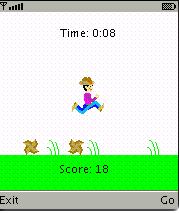
你一定看到了,我把得分安放在下部,时间放置在上面. (为了简单起见,当牛仔超时了这个游戏就结束.) 随着牛仔的跑动,我希望背景从右到左的滚动 (不然这么晓得屏幕咋跑啊...) 但是我希望时间和得分的显示固定在一个位置不动. 为了得到这个效果,我让jumpcanvas 类绘制固定的东东,而运动的东东则交给 layermanager全权负责 (后面会有更详细的介绍的).
请看paint(graphics g)方法,首先我通过graphics对象得到屏幕的大小,并且根据这些大小计算对象将被绘制的位置. 如果你很在意java"write once, run anywhere"的特性, 比起那些使用是指常量的绘制代码,动态的计算绘制位置是一个比较好的方法.即使如此,你的游戏代码在具有不同尺寸的显示器上运行起来仍然可能很滑稽(不是太大,就是太小). 如果屏幕的尺寸超过了一定的限度,与其让它滑稽的运行下去还不如直接抛出的异常直截了当.
在paint(graphics g)方法计算完需要绘制的位置后, 我使用 g.fillrect 把屏幕绘制成上白下绿两部分,然后使用g.drawstring来绘制时间以及得分。我计算出两个区域之间的大小,并且把它传给我定义的 layermanager的子类.
layermanager 类(千呼万唤始出来啊)
j2me游戏中最有趣的图形对象通常是有javax.microedition.lcdui.game.layer来表现的.背景层可以使用 javax.microedition.lcdui.game.tiledlayer来实现, 游戏主角(包括他的敌人) 则是javax.microedition.lcdui.game.sprite的实例, 不管怎么说,他们都是layer的子类. layermanager的纸则就是帮助你管理那些图层. 你添加layers的顺序同时也决定了 layermanager 绘制他们的顺序(最早添加的最后绘制,先进后出.) 上层的图像会挡住下层的图像,不过如果你创建了透明的图层区域的话,还是可以透视的.
可能 layermanager 的最大特色就是你可以创建一个超大的图形区域,而绘制的时候只选择绘制其中的一部分. 这个绘制机制好比是走马灯,在一个很大的图片上蒙了一层开有一个矩形小孔的纸,我们移动这个纸就看到不同的内容了. 所有的绘制内容会被保存在layermanager中, 而那个小洞自然就是用来的显示屏幕咯. 虚拟屏幕的存在为屏幕很小的手机编程提供了很大的便利. 如果你要你的主角在迷宫中探险的话,它这个机制一定帮了你不少忙. 不过这种机制会产生两个坐标系统. gamecanvas 的graphics对象拥有一个坐标系统, layermanager中的不同图层又按照 layermanager的坐标系统被存放。记住 layermanager.paint(graphics g, int x, int y) 按照gamecanvas的坐标系统绘制,然而 layermanager.setviewwindow(int x, int y, int width, int height)却是用layermanager的坐标系统来设置可见区域的.
在我的例子中,背景是相当简单的(仅仅是草的重复)。不过因为我需要牛仔左右走动的时候始终处在屏幕的中间,所以我需要不停的改变layermanager中的可显示部分. 通过在jumpmanager类中的paint(graphics g)方法中调用setviewwindow(int x, int y, int width, int height) 可以做到这点.我们来仔细的分析这中间的流程: gamethread 的主循环调用 jumpcanvas.checkkeys()方法查询按键状态后告诉 jumpmanager 类牛仔是否需要左右移动或者跳起. jumpcanvas 通过调用setleft(boolean left)或者jump()来通知 jumpmanager 该干什么. 如果牛仔是跳起状态, 那么 jumpmanager 调用 牛仔的精灵类的jump()方法. 如果是向左(或者右)走动,那么gamethread 让jumpcanvas 告诉 jumpmanager把牛仔向左移动一个象素,同时把可见区域向相反的方向移动一个象素,依次来保证牛仔在屏幕上的位置看起来没有发生变化. 这两个动作是通过修改 mycurrentleftx变量(控制 setviewwindow(int x, int y, int width, int height)的x坐标) 然后调用mycowboy.advance(gameticks, myleft)完成的. 当然我可以更加简单的直接绘制牛仔的图片而不把它加入到jumpmanager中去, 但是把它加到一个图层中与现实世界更加贴切. 移动牛仔同时,我还要移动滚草的位置,并且变换滚草的当前帧以产生动画,最后还要检测碰撞,更进一步的细节我会在以后给大伙说的. 再这个例程中,移动完了所有的元素后, jumpmanager 会wrap() 方法检查可见区域是否碰到了背景的边界了,如果是的画,还要调整一下显示,使得背景看起来是连续循环的的. 最后 jumpcanvas重新绘制屏幕然后再循环.
关于wrap()我还要再谈几句. 很不幸,layermanager 没有提供通过重复一个图片而产生背景卷动的功能. layermanager的绘制区域只有当传递到 setviewwindow(int x, int y, int width, int height) 的参数大于 integer.max_value才会有wrap效果, 不过这于事无补. 所以为了实现卷瓶,你只有自己动手写代码了.在我的例子中,程序每隔grass.tile_width*grass.cycle象素会产生草的的循环卷动. 所以可见区域的x坐标 (mycurrentleftx) 的值不会超过背景的宽度,并且当可见区域到头了,我会把可见区域连通其他需要绘制的对象一起搬回背景的中间,依次来防止玩家跑出边界
以下是jumpmanager.java的代码:
package net.frog_parrot.jump;
import javax.microedition.lcdui.*;
import javax.microedition.lcdui.game.*;
/**
* this handles the graphics objects.
*
* @author carol hamer
*/
public class jumpmanager extends javax.microedition.lcdui.game.layermanager {//---------------------------------------------------------
// dimension fields
// (constant after initialization)
/**
* the x-coordinate of the place on the game canvas where
* the layermanager window should appear, in terms of the
* coordiantes of the game canvas.
*/
static int canvas_x;
/**
* the y-coordinate of the place on the game canvas where
* the layermanager window should appear, in terms of the
* coordiantes of the game canvas.
*/
static int canvas_y;
/**
* the width of the display window.
*/
static int disp_width;
/**
* the height of this object's graphical region. this is
* the same as the height of the visible part because
* in this game the layer manager's visible part scrolls
* only left and right but not up and down.
*/
static int disp_height;
//---------------------------------------------------------
// game object fields
/**
* the player's object.
*/
cowboy mycowboy;
/**
* the tumbleweeds that enter from the left.
*/
tumbleweed[] mylefttumbleweeds;
/**
* the tumbleweeds that enter from the right.
*/
tumbleweed[] myrighttumbleweeds;
/**
* the object representing the grass in the background..
*/
grass mygrass;
/**
* whether or not the player is currently going left.
*/
boolean myleft;
/**
* the leftmost x-coordinate that should be visible on the
* screen in terms of this objects internal coordinates.
*/
int mycurrentleftx;
//-----------------------------------------------------
// gets/sets
/**
* this tells the player to turn left or right.
* @param left whether or not the turn is towards the left..
*/
void setleft(boolean left) {myleft = left;
}
//-----------------------------------------------------
// initialization and game state changes
/**
* constructor merely sets the data.
* @param x the x-coordinate of the place on the game canvas where
* the layermanager window should appear, in terms of the
* coordiantes of the game canvas.
* @param y the y-coordinate of the place on the game canvas where
* the layermanager window should appear, in terms of the
* coordiantes of the game canvas.
* @param width the width of the region that is to be
* occupied by the layoutmanager.
* @param height the height of the region that is to be
* occupied by the layoutmanager.
*/
public jumpmanager(int x, int y, int width, int height) {canvas_x = x;
canvas_y = y;
disp_width = width;
disp_height = height;
mycurrentleftx = grass.cycle*grass.tile_width;
setviewwindow(0, 0, disp_width, disp_height);
}
/**
* sets all variables back to their initial positions.
*/
void reset() { if(mygrass != null) {mygrass.reset();
}
if(mycowboy != null) {mycowboy.reset();
}
if(mylefttumbleweeds != null) { for(int i = 0; i < mylefttumbleweeds.length; i++) {mylefttumbleweeds[i].reset();
}
}
if(myrighttumbleweeds != null) { for(int i = 0; i < myrighttumbleweeds.length; i++) {myrighttumbleweeds[i].reset();
}
}
myleft = false;
mycurrentleftx = grass.cycle*grass.tile_width;
}
//-------------------------------------------------------
// graphics methods
/**
* paint the game graphic on the screen.
* initialization code is included here because some
* of the screen dimensions are required for initialization.
*/
public void paint(graphics g) throws exception {// create the player:
if(mycowboy == null) {mycowboy = new cowboy(mycurrentleftx + disp_width/2,
disp_height - cowboy.height - 2);
append(mycowboy);
}
// create the tumbleweeds to jump over:
if(mylefttumbleweeds == null) {mylefttumbleweeds = new tumbleweed[2];
for(int i = 0; i < mylefttumbleweeds.length; i++) {mylefttumbleweeds[i] = new tumbleweed(true);
append(mylefttumbleweeds[i]);
}
}
if(myrighttumbleweeds == null) {myrighttumbleweeds = new tumbleweed[2];
for(int i = 0; i < myrighttumbleweeds.length; i++) {myrighttumbleweeds[i] = new tumbleweed(false);
append(myrighttumbleweeds[i]);
}
}
// create the background object:
if(mygrass == null) {mygrass = new grass();
append(mygrass);
}
// this is the main part of the method:
// we indicate which rectangular region of the layermanager
// should be painted on the screen and then we paint
// it where it belongs. the call to paint() below
// prompts all of the appended layers to repaint themselves.
setviewwindow(mycurrentleftx, 0, disp_width, disp_height);
paint(g, canvas_x, canvas_y);
}
/**
* if the cowboy gets to the end of the graphical region,
* move all of the pieces so that the screen appears to wrap.
*/
void wrap() { if(mycurrentleftx % (grass.tile_width*grass.cycle) == 0) { if(myleft) {mycowboy.move(grass.tile_width*grass.cycle, 0);
mycurrentleftx += (grass.tile_width*grass.cycle);
for(int i = 0; i < mylefttumbleweeds.length; i++) {mylefttumbleweeds[i].move(grass.tile_width*grass.cycle, 0);
}
for(int i = 0; i < myrighttumbleweeds.length; i++) {myrighttumbleweeds[i].move(grass.tile_width*grass.cycle, 0);
}
} else {mycowboy.move(-(grass.tile_width*grass.cycle), 0);
mycurrentleftx -= (grass.tile_width*grass.cycle);
for(int i = 0; i < mylefttumbleweeds.length; i++) {mylefttumbleweeds[i].move(-grass.tile_width*grass.cycle, 0);
}
for(int i = 0; i < myrighttumbleweeds.length; i++) {myrighttumbleweeds[i].move(-grass.tile_width*grass.cycle, 0);
}
}
}
}
//-------------------------------------------------------
// game movements
/**
* tell all of the moving components to advance.
* @param gameticks the remainaing number of times that
* the main loop of the game will be executed
* before the game ends.
* @return the change in the score after the pieces
* have advanced.
*/
int advance(int gameticks) {int retval = 0;
// first we move the view window
// (so we are showing a slightly different view of
// the manager's graphical area.)
if(myleft) {mycurrentleftx--;
} else {mycurrentleftx++;
}
// now we tell the game objects to move accordingly.
mygrass.advance(gameticks);
mycowboy.advance(gameticks, myleft);
for(int i = 0; i < mylefttumbleweeds.length; i++) {retval += mylefttumbleweeds[i].advance(mycowboy, gameticks,
myleft, mycurrentleftx, mycurrentleftx + disp_width);
retval -= mycowboy.checkcollision(mylefttumbleweeds[i]);
}
for(int i = 0; i < mylefttumbleweeds.length; i++) {retval += myrighttumbleweeds[i].advance(mycowboy, gameticks,
myleft, mycurrentleftx, mycurrentleftx + disp_width);
retval -= mycowboy.checkcollision(myrighttumbleweeds[i]);
}
// now we check if we have reached an edge of the viewable
// area, and if so we move the view area and all of the
// game objects so that the game appears to wrap.
wrap();
return(retval);
}
/**
* tell the cowboy to jump..
*/
void jump() {mycowboy.jump();
}
}

 闽公网安备 35060202000074号