■ 前言
在上一讲中我们讲述的是如何制作java手机多媒体功能中的动画,本讲中我们将介绍如何制作java手机的另一个多媒体功能――声音,即n800的音乐播放功能。若是在动画上再配以音乐播放功能,就能制作出具有丰富表现力的应用程序了。
■ 音乐播放
现在我们利用midp应用程序播放音乐。但是, midp标准api不支持声音播放功能。机种不同,则声音播放方法也不同,所以每个厂商都会使用他们各自扩展的api 。n800使用nec扩展的api,所以能用midp应用程序播放声音。
■ n800的音乐播放功能
n800只能播放smf(format 0)格式的音乐数据,最大文件尺寸为10kbyte。smf格式即standard midi file 的缩略语,就是为了能实现互换性而设定的文件形式,互换性是指在不同的应用程序中也具有能处理数据的特性。smf分为format0和format1两种格式。n800所采用的是format0格式。这两种格式具有以下不同特点。(表 1)
| format0 | midi的16频声音收录在1个磁道上的形式 |
format1 | 不限制磁道数量的形式 |
表 1
■ 播放音乐
接下来我们实际操作读取文件播放音乐的功能。
● 音乐数据的读取
利用扩展api上的media类的static方法读取音乐数据。自变量中记述了音乐数据文件的通过。audioclip audio = media.getaudioclip(“/test.mid”);
另外,能够从web上获得音乐数,并且能够从rms中得到音乐数据。但,由于形式相同,这里就不特别讲述了。详细情况请参考扩展api文档。
● 播放
播放读取的音乐数据。使用audioclip例子(在这称为audio)play方法播放。
audio.play();
而且也能同时播放两个以上的音乐数据。此时,使用audioclip例子(在这称为audio1、audio2)play方法播放。
audio1.play();
audio2.play();
上述情况下能够同时播放audio1,audio2。
● 停止
能够暂停音乐的播放。使用audioclip例子的stop方法能够停止。
audio.stop();
● 其他功能
audioclip定义了读取其他音乐数据信息的方法和决定反复播放次数的方法。(表 2)
| getchannel() | 取得音乐数据的频数 |
getlapsedtime() | 以ms为单位取得所演奏的音乐数据的播放时间 |
gettempo() | 取得音乐数据的速度 |
gettime() | 取得音乐数据的播放时间 |
setloopcount(int count) | 设定演奏的音乐数据的反复播放次数 |
表 2
■ 音频事件
音频演奏过程中,演奏开始时、停止时、结束时都会发生音频事件,能定义此时的处理。要定义音频事件发生时的处理,有必要安装audiolistener接口和记述audioaction方法内的处理。
然后,使用audioclip对象的addaudiolistener方法进入audiolistener。
public class audiotest implements audiolistener {
/**
* 构造函数
**/
public audiotest() {
audioclip audio = media.getaudioclip("/test.mid");// 读取音乐数据
audio.addaudiolistener(this);// 注册audio事务监听器
}
/**
* 音频事件的处理
**/
public void audioaction(audioclip sound, int event, int param) {
//记述处理
•
•
}
} |
ex. 1
记述处理的audioaction方法的自变量如下所示。
| audioclip sound | 传递事件发生来源的对象 |
int event | 传递事件的种类 |
int param | 传递事件的参数。由于事件不同,则参数的意思也不同。不包含参数的事件的情况下,只传递0 |
表 3
此外,事件的种类(audioaction方法的自变量、事件)在audiolistener接口文件夹中定义如下。(表 4)
| static int audio_complete | 表示音乐播放结束 |
| static int audio_started | 表示音乐播放开始 |
| static int audio_complete | 表示音乐播放停止 |
表 4
以下展示的是只播放音频数据的简单范例。
import javax.microedition.lcdui.display;
import javax.microedition.midlet.midlet;
import javax.microedition.midlet.midletstatechangeexception;
/**
* 音乐播放的简单范例
*/
public class audio extends midlet { display display;
audiocanvas canvas; /**
* 构造函数
*/
public audio() {
canvas = new audiocanvas();
display = display.getdisplay(this);
} protected void startapp() throws midletstatechangeexception {
display.setcurrent(canvas);
} protected void pauseapp() {}
protected void destroyapp(boolean arg0) throws midletstatechangeexception {}
} import javax.microedition.lcdui.*;
import com.nec.media.*; /**
* 音频 canvas
**/
public class audiocanvas extends canvas
implements runnable, commandlistener, audiolistener { command start = new command("play", command.ok, 0);
command stop = new command("stop", command.ok, 0); audioclip a;// 音乐数据 thread th; /**
* 构造函数
**/
public audiocanvas() { a = media.getaudioclip("/_test.mid");// 读取音乐数据
a.addaudiolistener(this);// 注册 audiolistener this.addcommand(start);
this.addcommand(stop);
this.setcommandlistener(this); th = new thread(this);
th.start();
} /**
* 音频事件的处理
*/
public void audioaction(audioclip sound, int event, int param) { if (sound == a) {
if (event == audiolistener.audio_complete) {
sound.play(); }
}
} /**
* 描绘处理
*/
protected void paint(graphics g) {
g.setcolor(255, 255, 255);
g.fillrect(0, 0, getheight(), getwidth()); g.setcolor(0, 0, 0);
g.drawstring("music play?", 50, 52, graphics.top | graphics.left);
g.drawstring(
"channel=" + a.getchannel(),
30,
64,
graphics.top | graphics.left);
g.drawstring(
"lapsed time=" + a.getlapsedtime(),
30,
76,
graphics.top | graphics.left);
g.drawstring(
"tempo=" + a.gettempo(),
30,
88,
graphics.top | graphics.left);
g.drawstring(
"time=" + a.gettime(),
30,
100,
graphics.top | graphics.left);
} /**
* 命令事件的处理
*/
public void commandaction(command c, displayable d) { system.out.println("test");
if (c.equals(start)) {
a.play();
} else if (c.equals(stop)) {
a.stop();
}
} /**
* 线程的处理
* 刷新查看
*/
public void run() { while (true) {
repaint();
try{
thread.sleep(500);
}catch(exception e){ }
}
}
} |
ex. 2
接受表示音乐播放结束的事件后,根据明确的开始播放音乐菜单可以无限循环地播放音乐。下面的演示详细记述了上述例子中的audioaction方法,能够实现无限循环播放。(ex. 3)
/**
* 音频事件的处理
*/
public void audioaction(audioclip sound, int event, int param) { if (sound == a) {
if (event == audiolistener.audio_complete) {
sound.play();
}
}
} |
ex. 3
制作应用程序
接下来制作实际的发声应用程序。
本讲中制作的是简单的“泡泡龙”游戏。
■ 游戏方法
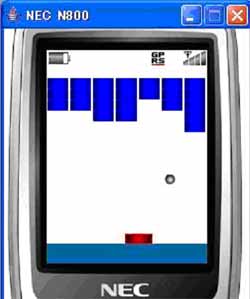
移动小棒接住反弹的球使其不掉下去,使上方的彩球逐渐消失的游戏。彩球完全消失并清除后,球再落下则此游戏通过。
■ 准备工作
准备游戏必备的图片和音效。
准备以下图片。

图1 球的图片

图2 小棒的图片

图3 彩球的图片
? 背景音乐 ( bgm.mid )
? 球反弹时的音效 ( ball.mid )
? 彩球破碎时的音效 ( block.mid )
■ 设计
以下是状态连接图(?? 4)
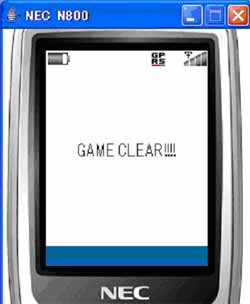
本讲中为了简单化,在启动应用程序的同时立刻就启动游戏。形成游戏开始、球落下后游戏结束、全部清除彩球后游戏过关。
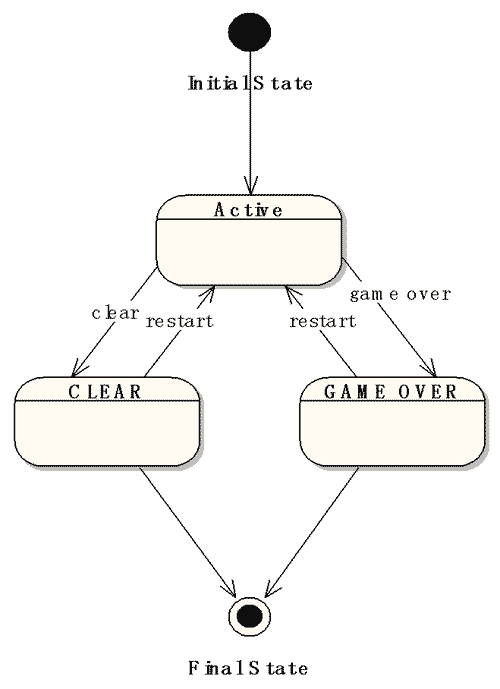
figure 4
■ 制作应用程序
现在我们按照以下顺序制作应用程序。
1.类结构
2.变量、常量的定义
3.查看图片和音效
4.使图片运动
5.球的反弹
6.音乐的播放
1.类结构
下表内容是类结构。(表 5)
| blockapplication | 泡泡龙游戏的midlet |
| blockcanvas | 泡泡龙游戏的canvas |
表 5 2. 变量、常量的定义
将下面的应用变量、定量作为blockcanvas例子的属性并定义。(ex. 4)
// 状态设定
private int state; // 状态
private final int active = 1;
private final int game_over = 2;
private final int clear = 3; // 彩球的设定
private final int block_h = 7; // 彩球横向的个数
private final int block_v = 5; // 彩球纵向的个数
private final int block_width = getwidth() / block_h;
private final int block_height = block_width / 2;
private boolean block[][] = new boolean[block_h][block_v];
private int blockcount; // 彩球个数
// 小棒的设定
private final int bar_height = 11;
private final int bar_width = 23;
private int barx = 0;
private int bary = getheight() - bar_height;
private int barmovcode example = 0; // 球的设定
private final int ball_height = 10;
private final int ball_width = 10;
private int ballx;
private int bally;
private int ballmovcode example = 5;
private int ballmovey = 5; private thread th; // 画面类
private image barimg = null;
private image ballimg = null;
private image blockimg = null; // 音效类
private audioclip bgm; // background music
private audioclip ballsound; // sound of bouncing ball
private audioclip blocksound; // sound of destroying blocks |
ex. 4
3. 查看图片和音效
查看准备好的图片和音效。blockcanvas的构造函数内分别读取小棒、球、彩球的图片。(ex. 5)
// 读取图片
try {
barimg = image.createimage("/bar.png");
ballimg = image.createimage("/ball.png");
blockimg = image.createimage("/block.png");
} catch (code exampleception e) {
e.printstacktrace();
} |
ex. 5
能查看读取后的图片。
彩球在图中的分配为横7纵5,读取彩球图片并描画在画面中。用旗表示彩球的状态。保持原来的排列。将一个一个的彩球使用原来的排列并计算出坐标,安排在画面中。(ex. 6)
// 查看彩球
g.setcolor(0, 0, 255);
for (int i = 0; i < block_h; i++) { /
for (int j = 0; j < block_v; j++) {
if (block[i][j]) {
g.drawimage(
blockimg,
i * block_width,
(j + 1) * block_height,
graphics.left | graphics.top);
}
}
} |
ex. 6
接着查看球和小棒。在paint方法中有以下叙述。(ex. 7)
// 查看球
g.drawimage(ballimg, ballx, bally, graphics.left | graphics.top);
// 查看小棒
g.drawimage(barimg, barx, bary, graphics.left | graphics.top); |
ex. 7
图片安装完成后出现如下画面。
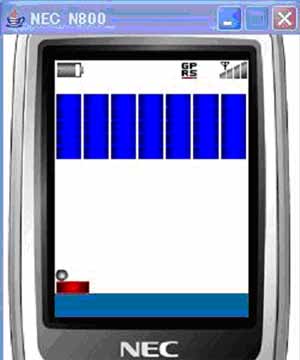
4. 使图片运动
接下来使用线程和按键事件移动球和小棒。为了使用线程就得在audiocanvas类中安装runnable接口、记述run方法。使用球和小棒定义的移动速度分别变化球和小棒的坐标。此外,小棒的移动速度根据按键处理而变化。以下记述了run方法 。 (ex. 8)
/**
* 线程的运行处理
*/
public void run() { while (state == active) { moveball();// 使球运动
movebar();// 移动小棒
repaint();// 再次描画 try {
thread.sleep(50);
} catch (interruptedcode exampleception e) {
e.printstacktrace();
break;
}
}
} /**
// 使球运动
*/
public void moveball() {
ballx += ballmovcode example;
bally += ballmovey;
} /**
* 移动小棒
*/
public void movebar() {
barx += barmovcode example;
// 不能向画面外移动
if (barx < 0) {
barx = 0;
} else if (barx + bar_width > getwidth()) {
barx = getwidth() - bar_width;
}
} |
ex. 8
以下表示的是按键处理。(ex. 9)
/*****************************************
* 按键处理
*****************************************/
/**
* 按按键时
*/
protected void keypressed(int key) {
if (state == active) {// 正在运动
if (getgameaction(key) == canvas.right) {
barmovcode example = 6;
} else if (getgameaction(key) == canvas.left) {
barmovcode example = -6;
}
repaint();
}else{// 停止运动后
// 再次启动
this.initialize();
}
} /**
* 释放按键时
*/
protected void keyreleased(int key) {
barmovcode example = 0;
} |
ex. 9
5. 球的反弹
下面是球的反弹。
球的反弹形式有以下3种。
? 碰边壁后反弹
? 碰小棒后反弹
? 碰彩球后反弹
记述了每个moveball方法。(ex. 10)
碰彩球的反弹时
block[i][j] = false;
blockcount--;
彩球立刻就破碎。彩球破碎后余下的彩球数量blockcount将有所减少。
另外,球掉落时,改变游戏状态后游戏结束。
/**
// 使球运动
*/
public void moveball() {
ballx += ballmovcode example;
bally += ballmovey; // 反弹
// 碰边壁后反弹
if (ballx < 0) {
ballmovcode example *= -1;
ballx = 0;
} else if (getwidth() < ballx + ball_height) {
ballx = getwidth() - ball_height;
ballmovcode example *= -1;
}
if (bally < 0) {
ballmovey *= -1;
bally = 0;
} else if (bally > getheight()) { // 球落下后
// 游戏结束
state = game_over;
} // 碰上小棒后反弹
if (bally + ball_height > bary
&& ballx + ball_width > barx
&& ballx < barx + bar_width) {
ballmovey *= -1;
bally = bary - ball_height;
if (barmovcode example < 0) {
ballmovcode example -= 2;
} else if (barmovcode example > 0) {
ballmovcode example += 2;
}
}
// 碰上彩球后反弹
for (int i = 0; i < block_h; i++) {
for (int j = 0; j < block_v; j++) {
if (block[i][j]) {
if (ballx + ball_width > i * block_width
&& ballx < (i + 1) * block_width) {
if (bally + ball_height > (j + 1) * block_height
&& bally < (j + 2) * block_height) {
// 清除彩球
block[i][j] = false;
blockcount--;
ballmovey *= -1; }
}
}
}
}
} } |
ex. 10
碰小棒后反弹情况如下所示:向右按键时,球就会让右方快速移动,反之,向左按键时,球则向左方快速移动。(ex. 11)
if (barmovex < 0) {
ballmovex -= 2;
} else if (barmovex > 0) {
ballmovex += 2;
} |
ex. 11
? 清除检查
至此安装完毕游戏就有雏形了。但是,在现在的程序中即使彩球全部消失,游戏也不能清除。那么,球与彩球相撞时,数出彩球的剩余数。当该数值为0时,则游戏清除。以下记述的是该处理。(ex. 12)
// 清除彩球
block[i][j] = false;
blockcount--; ballmovey *= -1; // 播放音效
blocksound.play(); // 检查游戏清除
if (blockcount == 0) {
state = clear;
} |
ex. 12
6. 音乐播放
在本讲中的泡泡龙游戏的应用程序中最好使用bgm和音效。游戏开始的同时演奏bgm,音效则是球在碰壁、碰小棒反弹时,以及彩球破碎时才播放的。
? 读取
用blockapplication构造函数读取音乐数据。而且,这里的bgm能够循环播放,所以可以使用音频事件处理。(ex. 13)
//声音数据的读取
bgm = media.getaudioclip("/bgm.mid");// 背景音乐
ballsound = media.getaudioclip("/ball.mid");// 球反弹后的音效
blocksound = media.getaudioclip("/block.mid");// 球破碎的音效
bgm.addaudiolistener(this);// 增加 audiolistener |
ex. 13
? 播放
读取音乐数据后,接下来进行播放。bgm在游戏开始的同时能够播放,所以在audiocanvas类的start方法中记述播放处理并能够播放出来。
球的音效:用moveball方法进行下面反弹判断时,能够播放音效。(ex. 14)
// 反弹
// 碰边壁后反弹
if (ballx < 0) {
ballmovex *= -1;
ballx = 0;
// 播放音效
ballsound.play();
} else if (getwidth() < ballx + ball_height) {
ballx = getwidth() - ball_height;
ballmovex *= -1;
// 播放音效
ballsound.play();
}
if (bally < 0) {
ballmovey *= -1;
bally = 0;
// 播放音效
ballsound.play();
} else if (bally > getheight()) { // 球落下后
// 游戏结束
state = game_over;
} // 碰上小棒反弹
if (bally + ball_height > bary
&& ballx + ball_width > barx
&& ballx < barx + bar_width) {
ballmovey *= -1;
bally = bary - ball_height; if (barmovex < 0) {
ballmovex -= 2;
} else if (barmovex > 0) {
ballmovex += 2;
} // 播放音效
ballsound.play();
} |
ex. 14
彩球的音效:用moveball方法判定彩球的碰撞时,如下记述并能够播放。 (ex. 15)
// 碰上彩球后反弹
for (int i = 0; i < block_h; i++) {
for (int j = 0; j < block_v; j++) {
if (block[i][j]) {
if (ballx + ball_width > i * block_width
&& ballx < (i + 1) * block_width) {
if (bally + ball_height > (j + 1) * block_height
&& bally < (j + 2) * block_height) {
block[i][j] = false;
ballmovey *= -1; // 播放音效
blocksound.play();
}
}
}
}
} |
ex. 15
■ 完成
下面是实际制作的程序一式。 ( blockapplication.zip )
运行结果如下所示。
总结
在本讲的讲解中能够自由播放音乐数据了。因此,能够制作成创造性的应用程序。但是,扩展应用程序时,不能保存高分、数据等 。在下讲我们将学习如何使用固定存储器保存数据的方法。
n820 问世
在本栏目中简单将n800和n800的后继机种n820进行一下比较。
■ n820的特点
256kbyte存储空间 255x240(纵x横)和65535色的显示屏 查看png格式的画面文件 播放smf格式的音乐文件 http通信,socket通信 逆光、双感光板控制 sprite功能 imagemap功能 各种各样的制图扩展功能 3d引擎
由于n820具有256kbyte的较大存储空间,所以能制作容量稍大、自由度较高的手机应用程序。另外,也能制作对应http、socket通信的自由度较高网络应用程序。因此,也能够搭载3d引擎、3d描画。而且还能安装n800对应的sprite功能、imagemap功能的描画功能。
■ 与n800的比较
下表是n800和n820的比较。(表 6)
| 项目 | n800 | n820 | | 显示屏尺寸 | 180x162(纵x横) | 255x240(纵x横) | | jad文件尺寸 | 最大 2 kb | 最大 2 kb | | jar文件尺寸 | 最大 50 kb | 最大 1 mb | | rms尺寸 | 最大 10 kb | 最大 10 kb | | 记录存储数量 | 最大 3 records | 最大 3 records | | 通信协议 | 只有http | http and socket | | 画像文件 | png | png | | 音乐文件 | smf(format 0) 最大10kbyte | smf(format0) 最大10kbyte |
表 6 ■ nec n820 application模拟器
下面是模拟n820工作的模拟器,称为「nec 820 application emulator」。与以前我们所介绍的「nec n800 application emulator」在外观上没有什么区别。(?? 5)
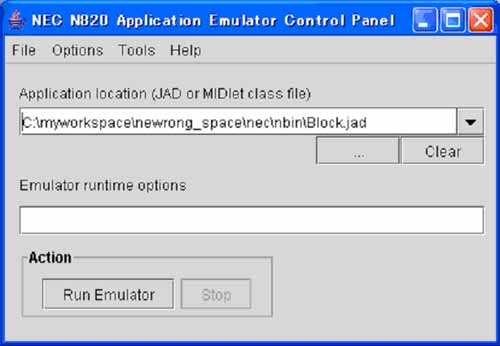
图 5 打开模拟器,就是现在的手机画面表示。与n800相比,手机设计多少有些变化,手机的内显示屏变大了。下图是用n820 application emulator制作的“泡泡龙”游戏画面。“泡泡龙”游戏由于是假定在n800的屏幕上应用的。因此画面尺寸要比n820中的内屏尺寸稍小。因此,彩球之间存有空隙。(?? 6)
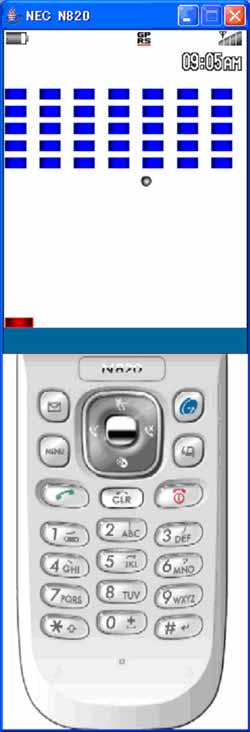
?? 6 ■ 总结
n820的优点是具有256kbyte的大容量存储空间,而且使用3d图表引擎、3d图表应用程序、能够制作成对应socket通信的tcp/ip网络应用程序。对于应用开发者而言,n820是一部制作java应用程序非常有价值的终端。对于寻求高级机种的用户而言,应该是一部高精细画面、高功能的极大满足用户需要的终端。今后n820的用户应该会大幅度增加的。 |



 闽公网安备 35060202000074号