
笔者刚刚开始学习写游戏,并没有什么经验,因此选择了门槛比较低的猜数字游戏。花了一天的时间,基本能够在nokia6108上运行了,界面比较简单,为学习之用。
下面介绍一下如何实现猜数字游戏,其实这是一个比较经典的游戏。游戏的原理是:游戏开始的时候会自动产生四个不重复的随机数字比如1234,用户输入四个数字,系统通过判断返回给用户xayb的结果,其中a代表数字正确位置也正确,b代表数字正确但是位置不正确。如果用户猜对游戏就结束了,10次内没有猜对,游戏也结束。在这里我们重点介绍为游戏而实现的组件,简单的流程控制和游戏逻辑。
首先介绍组件,这里我们提供了两个组件,一个就是button,他可以接收用户输入的数字,并且可以响应用户的按键事件。
首先我们构造一个基本的组件,这个组件需要包括左上角顶点的坐标(x,y),宽度w,高度h以及前景色、背景色。最重要的一点是我们需要给他提供一个容器来管理他,因此提供一个manager类。
package com.j2medev.numbergame;
import javax.microedition.lcdui.*;
import com.nokia.mid.ui.*;
//a root class for canvas-based components.
//because area extends canvas, you can actually
//use a component directly as a canvas, although
//it's recommended you place it on manager.
public abstract class area extends fullcanvas
{
protected int x;
protected int y;
protected int w;
protected int h;
protected font font;
protected manager parent;
protected int backcolor = -1;
protected int forecolor = -1;
protected area(int x, int y, int w, int h)
{
this(x, y, w, h, null);
}
protected area(int x, int y, int w, int h, font f)
{
this.x = x;
this.y = y;
this.w = w;
this.h = h;
this.font = f;
}
// erase the background using backcolor
protected void erasebackground(graphics g)
{
g.setcolor(getbackcolor());
if (parent == null)
{
g.fillrect(0, 0, getcanvaswidth(), getcanvasheight());
} else
{
g.fillrect(0, 0, w, h);
}
}
public final int getbackcolor()
{
if (backcolor == -1)
{
if (parent != null)
{
return parent.getbackcolor();
}
backcolor = 0xffffff;
}
return backcolor;
}
protected final int getcanvasheight()
{
return super.getheight();
}
protected final int getcanvaswidth()
{
return super.getwidth();
}
public final int getheight()
{
return h;
}
public final int getwidth()
{
return w;
}
public final int getx()
{
return x;
}
public final int gety()
{
return y;
}
public final font getfont()
{
if (font == null)
{
if (parent != null)
{
return parent.getfont();
}
font = font.getfont(font.face_system, font.style_plain,
font.size_small);
;
}
return font;
}
public final int getforecolor()
{
if (forecolor == -1)
{
if (parent != null)
{
return parent.getforecolor();
}
forecolor = 0;
}
return forecolor;
}
public manager getparent()
{
return parent;
}
public void keypressed(int keycode)
{
}
public void keyreleased(int keycode)
{
}
public void keyrepeated(int keycode)
{
}
protected void movefocus(boolean forward)
{
if (parent != null)
{
parent.movefocus(forward);
}
}
// if the area is acting like a canvas, call
// the real paint routine
protected void paint(graphics g)
{
erasebackground(g);
g.setcolor(getforecolor());
g.setfont(getfont());
paintarea(g, true);
}
// the manager calls this paint routine on each of
// its children
public final void paint(graphics g, boolean hasfocus)
{
int cx = g.getclipx();
int cy = g.getclipy();
int ch = g.getclipheight();
int cw = g.getclipwidth();
font f = g.getfont();
int col = g.getcolor();
erasebackground(g);
g.setclip(x, y, w, h);
g.setfont(getfont());
g.setcolor(getforecolor());
paintarea(g, hasfocus);
g.setclip(cx, cy, cw, ch);
g.setfont(f);
g.setcolor(col);
}
// subclass implements to do actual painting
protected abstract void paintarea(graphics g, boolean hasfocus);
// repaint the area of the given child
public void repaintarea(area child, boolean now)
{
if (parent != null)
{
parent.repaintarea(child, now);
} else
{
repaint(child.getx(), child.gety(), child.getwidth(), child
&nbs
p; .getheight());
if (now)
{
servicerepaints();
}
}
}
public void setbackcolor(int col)
{
backcolor = col;
}
public void setforecolor(int col)
{
forecolor = col;
}
protected void setparent(manager parent)
{
this.parent = parent;
}
}
这是一个抽象类,他的抽象方法protected abstract void paintarea(graphics g, boolean hasfocus);是留给他的子类实现的。因此我们在子类中重点需要关注的就是如何来绘制自己和根据用户的输入做出响应。下面我们来实现button类,我们需要提供一个buttonlistener类,通过他我们可以实现回调的功能,即在按键按下的时候去做buttonlistener中规定的方法,非常类似于commandlistener的功能。
package com.j2medev.numbergame;
public interface buttonlistener
{
public void buttonpressed(button pushed);
}
下面是button类的代码
package com.j2medev.numbergame;
import javax.microedition.lcdui.*;
public class button extends area
{
private string label;
private boolean selected;
private buttonlistener listener;
private boolean modifiable = true;
private int marginx = 4;
private int marginy = 4;
public button(string label, int x, int y)
{
this(label, x, y, 0, 0, null);
}
public button(string label, int x, int y, font f)
{
this(label, x, y, 0, 0, f);
}
public button(string label, int x, int y, int w, int h)
{
this(label, x, y, w, h, null);
}
public button(string label, int x, int y, int w, int h, font f)
{
super(x, y, w, h, f);
if (label == null)
label = "";
int tw = calcminwidth(label, getfont());
int th = calcminheight(label, getfont());
if (tw > w)
this.w = tw;
if (th > h)
this.h = th;
this.label = label;
}
public void setmodifiable(boolean flag)
{
this.modifiable = flag;
}
public static int calcminwidth(string text, font f)
{
return f.stringwidth(text) + 8;
}
public static int calcminheight(string text, font f)
{
return f.getheight() + 8;
}
public string getlabel()
{
return label;
}
public void setmargin(int x,int y)
{
this.marginx = x;
this.marginy = y;
}
protected void paintarea(graphics g, boolean hasfocus)
{
g.setstrokestyle(graphics.solid);
g.drawrect(x, y, w - 1, h - 1);
if (selected)
{
g.setcolor(getforecolor());
g.fillrect(x, y, w - 1, h - 1);
g.setcolor(getbackcolor());
} else if (hasfocus)
{
g.setstrokestyle(graphics.dotted);
g.drawrect(x + 3, y + 3, w - 7, h - 7);
g.setstrokestyle(graphics.solid);
}
g.drawstring(label, x + marginx, y + marginy, graphics.top | graphics.left);
}
public void keypressed(int keycode)
{
int num = keycode - 48;
if (num >= 0)
{
if (modifiable)
{
this.label = num + "";
}
repaintarea(this, true);
movefocus(true);
return;
}
int action = getgameaction(keycode);
switch (action)
{
case up:
case left:
movefocus(false);
break;
case down:
case right:
movefocus(true);
break;
case fire:
if (listener != null)
{
listener.buttonpressed(this);
}
break;
}
}
public void setlabel(string s)
{
this.label = s;
}
public void keyreleased(int keycode)
{
}
public void setlistener(buttonlistener listener)
{
this.listener = listener;
}
}
我们应该重点关注一下paintarea()方法,以及keypressed()方法。如果我们注册了一个buttonlistener给button的话,那么当按键事件发生的时候,buttonpressed()方法就会触发并且把这个按键传递给他,这样我们应用程序就可以根据用户的事件来处理相关的逻辑了。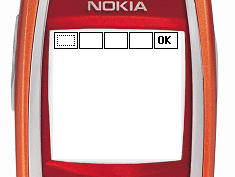
我们推荐制作一个容器类来管理我们的button,他会知道什么时候应该移动焦点,什么时候该去绘制它的“孩子”们。我们把这个类叫manager。
package com.j2medev.numbergame;
import java.util.*;
import javax.microedition.lcdui.*;
// a subclass of area that can act as
// the parent for other components.
public class manager extends area
{
protected vector children = new vector();
protected area focus = null;
public manager()
{
super(0, 0, 0, 0, null);
w = getcanvaswidth();
h = getcanvasheight();
}
public void add(area child)
{
if (!children.contains(child))
{
children.addelement(child);
child.setparent(this);
&nb
sp; repaintarea(child, false);
}
}
protected area getfocus()
{
if (focus == null && children.size() > 0)
{
focus = (area) children.elementat(0);
}
return focus;
}
public void keypressed(int keycode)
{
area focus = getfocus();
if (focus != null && focus != this)
{
focus.keypressed(keycode);
}
}
public void keyreleased(int keycode)
{
}
public void keyrepeated(int keycode)
{
}
// called to move the focus to the next
// or previous component
protected void movefocus(boolean forward)
{
area oldfocus = getfocus();
if (oldfocus != null)
{
int i = children.indexof(oldfocus);
int last = children.size() - 2;
if (forward)
{
if (++i > last)
i = 0;
} else
{
if (--i < 0)
i = last;
}
focus = (area) children.elementat(i);
repaintarea(oldfocus, false);
repaintarea(focus, true);
}
}
public void remove(area child)
{
if (children.removeelement(child))
{
child.setparent(null);
repaintarea(child, false);
}
}
protected void paint(graphics g)
{
if (focus == null)
getfocus();
erasebackground(g);
g.setcolor(getforecolor());
int n = children.size();
for (int i = n - 1; i >= 0; --i)
{
try
{
area area = (area) children.elementat(i);
area.paint(g, (focus == area));
} catch (exception e)
{
e.printstacktrace();
}
}
}
protected void paintarea(graphics g, boolean hasfocus)
{
}
}
在猜数字游戏中,我们还需要一个用于显示用户输入和系统返回纪录的组件,他同样继承与area,但是他不需要获得焦点。只是显示结果。
package com.j2medev.numbergame;
import javax.microedition.lcdui.font;
import javax.microedition.lcdui.graphics;
public class mark extends area
{
private int px;
private int py;
private int count = 0;
private int[][] ab = new int[10][2];
private int[][] input = new int[10][4];
private boolean first = true;
private boolean open = false;
public mark(int x, int y, int w, int h)
{
super(x, y, w, h);
px = x;
py = y;
}
public mark(int x, int y, int w, int h, font f)
{
super(x, y, w, h, f);
px = x;
py = y;
}
public int getcount()
{
return count;
}
public void setcount(int count)
{
this.count = count;
}
public void reset()
{
setcount(0);
this.first = true;
}
public void setab(int[] ab)
{
this.ab[count][0] = ab[0];
this.ab[count][1] = ab[1];
}
public void setinput(int[] input)
{
for(int i = 0;i<input.length;i++)
{
this.input[count][i] = input[i];
}
}
public void setopen(boolean open)
{
this.open = open;
}
public int getlineheight()
{
return this.getfont().getheight();
}
private string getinput(int count)
{
return ""+input[count][0]+input[count][1]+input[count][2]+input[count][3];
}
protected void paintarea(graphics g, boolean hasfocus)
{
if (first)
{
first = false;
return;
}
if (open)
{
count++;
if (count <= 5)
{
for (int i = 0; i < count; i++)
{
g.drawstring(i + 1 + ":" + ab[i][0] + "a" + ab[i][1] + "b "+getinput(i),
px, py + i * getlineheight(), graphics.top
&nbs
p; | graphics.left);
}
} else
{
for (int i = 0; i < 5; i++)
{
g.drawstring(i + 1 + ":" + ab[i][0] + "a" + ab[i][1] + "b "+getinput(i),
px, py + i * getlineheight(), graphics.top
| graphics.left);
}
for (int j = 5; j < count; j++)
{
g.drawstring(j + 1 + ":" + ab[j][0] + "a" + ab[j][1] + "b "+getinput(j),
px + this.getwidth()/2+1, py + (j - 5)
* getlineheight(), graphics.top
| graphics.left);
}
}
}
}
}

 闽公网安备 35060202000074号