
新增一个struts配置文件
考虑到图书模块是一个比较独立的模块,为了避免对struts配置文件的资源争用导致团队工程的覆盖或冲突,我们为这个模块单独提供一个新的struts配置文件,用这个配置文件配置图书模块所有struts关联的信息。
我们按照如下的方式为webmodule模块添加一个名为book-struts-config.xml的配置文件。
首先到<工程目录>/webmodule/web-inf拷贝一个原有的struts-config.xml文件,更名为book-struts-config.xml放在struts-config.xml相同的目录下,删除原有配置的内容,将其调整成:
<?xml version="1.0" encoding="utf-8"?>
<!doctype struts-config public "-//apache software foundation//dtd struts configuration 1.1//en" "http://jakarta.apache.org/struts/dtds/struts-config_1_1.dtd">
<struts-config>
</struts-config>
然后,在工程窗格的资源树中定位到webmodule->deployment descriptors-><struts 1.1>节点上,右击<struts 1.1>节点,在弹出的菜单中选择properties...弹出properties for ’<struts 1.1>’对话框,如图 16所示:
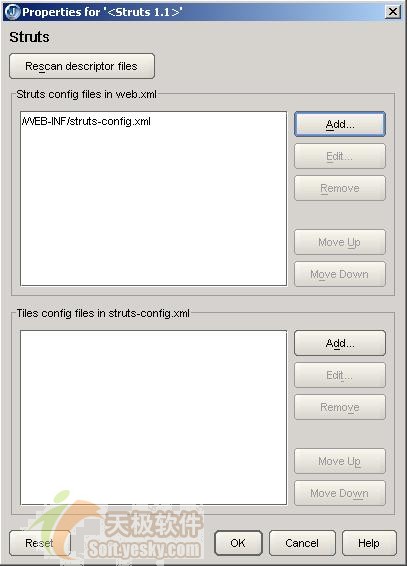
图 16 struts配置文件维护对话框
点击add...按钮,在弹出的choose struts config file对话框中选择book-struts-config.xml配置文件,按ok这个新的struts配置文件将添加到struts config file in web.xml列表中。
新增配置文件成功后,在工程窗格资源树的<struts 1.1>节点下,你将会发现这个新加入的struts配置文件,如下图所示:
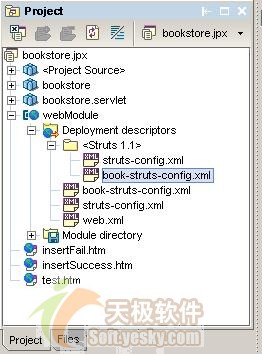
图 17 两个struts配置文件
这样,在创建新的formbean或action时,你就可以选择用哪个配置文件来保存struts的配置信息了。
图书action form
下面我们着手创建用于接收新增图书页面表单数据的bookactionform,使用book-struts-config.xml保存bookactionform的配置信息。bookactionform需要进行数据有效性自检,也就是说,要让bookactionform实现validate()方法。
创建bookactionform和创建useractionform相似,但是在向导的第1步需要指定book-struts-config.xml记录bookactionform配置信息,如图 18所示:
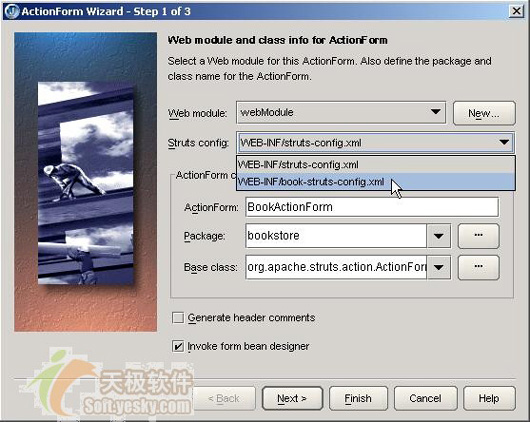
图 18 选择不同的配置文件
我们在前一节为web模块添加了一个配置文件,在struts config下拉框中列出了web模块所有配置文件,这里我们选择web-inf/book-struts-config.xml。
在向导的第2步,我们为bookactionform定义下列5个属性:
string bookid;//图书id,对应t_book表的book_id,是主键。
string isbn;//isbn
string createdate;//创建日期
string bookname;//书名
string author;//作者
在向导的第2步直接按finish创建bookactionform。由于bookid属性是主键,所以不能和t_book中已有的记录重复,这可以通过bookactionform的数据自检机制来完成,数据自检是通过定义validate()方法来实现的。向导已经为bookactionform生成了validate()方法框架,我们只需要在validate()方法编写bookid的校验的代码就可以了,bookactionform的最终代码如代码清单 10所示:
代码清单 10 bookactionform.java
1. package bookstore;
2.
3. import javax.servlet.http.httpservletrequest;
4. import org.apache.struts.action.*;
5. import java.sql.*;
6.
7. public class bookactionform
8. extends actionform {
9. …
10. public actionerrors validate(actionmapping actionmapping,
11. httpservletrequest httpservletrequest) {
12. actionerrors errors = new actionerrors();
13. connection conn = null;
14. try {
15. conn = dbconnection.getconnection();
16. preparedstatement pstat = conn.preparestatement(
17. "select count(*) count from t_book where book_id=?");
18. pstat.setstring(1, this.bookid);
19. resultset rs = pstat.executequery();
20. if (rs.next()&& rs.getint(1) > 0) {
21. errors.add("bookid ",
22. new actionmessage("bookstore.duplicate.bookid",
23. "图书id和数据库中已经有的id重复"));
24. }
25. }
26. catch (sqlexception se) {
27. se.printstacktrace();
28. errors.add("bookid",
29. new actionmessage("bookstore.dbaccess.error", "访问数据库时出错"));
30. }
31. finally {
32. try {
33. if (conn != null) {
34. conn.close();
35. }
36. }
37. catch (sqlexception ex) {
38. ex.printstacktrace();
39. errors.add("bookid",
40. new actionmessage("bookstore.dbaccess.error",
41. "访问数据库时出错"));
42. }
43. }
44. return errors;
45. }
46.
47. public void reset(actionmapping actionmapping,
48. httpservletrequest servletrequest) {
49. this.createdate = getcurrdatestr();
50. }
51.
52. //获取当前时间字符
53. private static string getcurrdatestr() {
54. simpledateformat sdf = new simpledateformat("yyyymmdd");
55. return sdf.format(new date());
56. }
57. }
当用户提交表单后,struts框架自动把表单数据填充到actionform中,接着struts框架自动调用actionform的validate()方法进行数据验证。如果validate()方法返回的actionerrors为null或不包含任何actionmessage对象,表示通过验证,struts框架将actionform和http请求一起传给action的execute(),否则struts框架将http请求返回到输入的页面中,而输入页面即可通过<html:errors>显示对应request域中的actionerrors错误信息显示出来。
此外,我们在reset()方法中将createdate属性置为当前的日期,因为这个属性值不是通过页面表单提供的。
新增图书jsp页面
1.通过向导创建bookadd.jsp
通过jsp向导创建bookadd.jsp页面,在向导的第2步选择使用struts1.1的struts-bean和struts-html标签,如图 19所示:
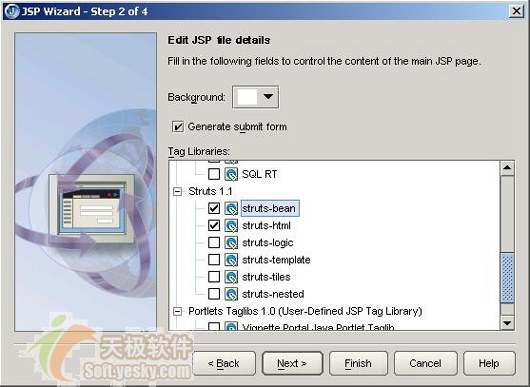
图 19 指定选用struts标签
2.使用jbuilder的struts标签构建jsp页面
你可以直接用拖拽的方法从jbuilder编辑器左边的标签库将struts标签添加到jsp页面中,如图 20所示:
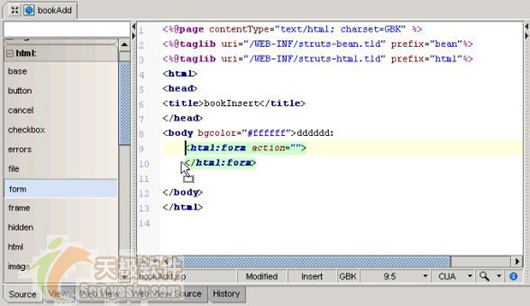
图 20 用拖拽的方式添加struts标签
struts的html标签可以完成和标准的html元素相同的功能,struts提倡使用struts html标签库,因为这些标签可以和struts框架的其他组件紧密地联系起来。而strtus的bean标签库可以访问已经存在的javabean及其属性,有一些bean标签还可以访问http请求头信息及web资源文件的信息。
我们希望用struts的html标签库创建添加图书的表单,通过bean标签库访问web资源文件作为表单组件前的标识文字。
bookadd.jsp的最终代码如代码清单 11所示:
代码清单 11 bookadd.jsp
1. <%@page contenttype="text/html; charset=gbk" %>
2. <%@taglib uri="/web-inf/struts-bean.tld" prefix="bean"%>
3. <%@taglib uri="/web-inf/struts-html.tld" prefix="html"%>
4. <html>
5. <head>
6. <title>bookinsert</title>
7. <script language="javascript" >
8. function mysubmit(form)
9. {
10. if(form.isbn.value == null || form.isbn.value == "")
11. {
12. alert("图书的isbn不允许为空");
13. return false;
14. }
15. if(form.bookname.value == null || form.bookname.value == "")
16. {
17. alert("图书名不允许为空");
18. return false;
19. }
20. }
21. </script>
22. </head>
23. <body bgcolor="#ffffff">
24. <html:errors/>
25. <html:form action="/bookinsertaction.do" focus="bookid" method="post"
26. onsubmit="return mysubmit(this)" >
27. <table width="100%%" border="0">
28. <tr>
29. <td>
30. <bean:message bundle="bookstore" key="bookstore.bookid"/>
31. </td>
32. <td>
33. <html:text name="bookactionform" property="bookid"/>
3

 闽公网安备 35060202000074号