
下图是struts的工作流程,前边我们提到,所有的请求都提交给actionservlet来处理。
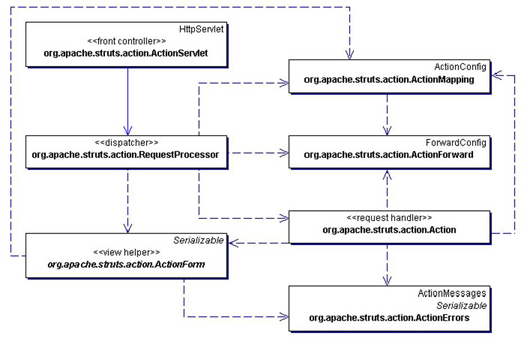
actionservlet是一个frontcontroller,它是一个标准的servlet,它将request转发给requestprocessor来处理,
actionmapping是actionconfig的子类,实质上是对struts-config.xml的一个映射,从中可以取得所有的配置信息
requestprocessor根据提交过来的url,如*.do,从actionmapping 中得到相应的actionforn和action。然后将request的参数对应到actionform中,进行form验证。如果验证通过则调用action的execute()方法来执行action,最终返回actionfoward。
actionfoward是对mapping中一个foward的包装,对应于一个url
actionform使用了viewhelper模式,是对html中form的一个封装。其中包含有validate方法,用于验证form数据的有效性。actionform是一个符合javabean规范的类,所有的属性都应满足get和set对应。对于一些复杂的系统,还可以采用dynaactionform来构造动态的form,即通过预制参数来生成form。这样可以更灵活的扩展程序。
actionerrors是对错误信息的包装,一旦在执行action或者form.validate中出现异常,即可产生一个actionerror并最终加入到actionerrors。在form验证的过程中,如果有error发生,则会将页面重新导向至输入页,并提示错误。
action是用于执行业务逻辑的requsesthandler。每个action都只建立一个instance。action不是线程安全的,所以不应该在action中访问特定资源。一般来说,应改使用 business delegate 模式来对business tier进行访问以解除耦合。
struts提供了多种action供选择使用。普通的action只能通过调用execute执行一项任务,而dispatchaction可以根据配置参数执行,而不是仅进入execute()函数,这样可以执行多种任务。如insert,update等。lookupdispatchaction可以根据提交表单按钮的名称来执行函数。
我们可以先回到刚才的例子,理解一下struts的流程。
下面我们看struts自带的example实例:
说明:实例二是struts自带的example程序, 实现了登录,注册,修改功能。
代码中大量应用了struts taglib,并且采用validator插件进行form的验证。
但是代码树立了一个不好的榜样,即把大量的业务逻辑写在了action中。
部分代码如下:
登录:logon.jsp
<%@ page con_tenttype="text/html;charset=utf-8" language="java" %>
// 声明taglib
<%@ taglib uri="/web-inf/struts-bean.tld" prefix="bean" %>
<%@ taglib uri="/web-inf/struts-html.tld" prefix="html" %>
<html:html locale="true">
<head>
// bean是用来从applicationresource中读取i18n信息
<title><bean:message key="logon.title"/></title>
<html:base/>
</head>
<body bgcolor="white">
// 错误信息部分
<html:errors/>
// 登录form,action为logion.do
<html:form action="/logon" focus="username"
on_submit="return validatelogonform(this);">
<table border="0" width="100%">
<tr>
<th align="right">
<bean:message key="prompt.username"/>:
</th>
<td align="left">
<html:text property="username" size="16" maxlength="18"/>
</td>
</tr>
<tr>
<th align="right">
<bean:message key="prompt.password" bundle="alternate"/>:
</th>
<td align="left">
<html:password property="password" size="16" maxlength="18" redisplay="false"/>
</td>
</tr>
<tr>
<td align="right">
<html:submit value="submit"/>
</td>
<td align="left">
<html:reset/>
</td>
</tr>
</table>
</html:form>
// validator插件,用于form验证
<html:javascript formname="logonform" dynamicjavascript="true" staticjavascript="false"/>
<script language="javascript1.1" src="staticjavascript.jsp"></script>
</body>
</html:html>
struts-config.xml配置
<form-beans>
<!-- logon form bean -->
<form-bean name="logonform" type="org.apache.struts.validator.dynavalidatorform">
<form-property name="username" type="java.lang.string"/>
<form-property name="password" type="java.lang.string"/>
</form-bean>
<!-- subscription form bean -->
<form-bean name="subscriptionform"type="org.apache.struts.webapp.example.subscriptionform"/>
</form-beans>
<action-mappings>
<!-- edit mail subscription -->
<action path="/editsubscription"
type="org.apache.struts.webapp.example.editsubscriptionaction"
attribute="subscriptionform"
scope="request"
validate="false">
<forward name="failure" path="/mainmenu.jsp"/>
<forward name="success" path="/subscription.jsp"/>
</action>
...
subscriptionform 是一个标准的actionform,其中reset方法用于清除form的值,validate方法用于验证
public final class subscriptionform extends actionform {
// the maintenance action we are performing (create or edit).
private string action = "create";
// should we auto-connect at startup time?
private boolean autoconnect = false;
// the host name.
private string host = null;
private string password = null;
private string type = null;
private string username = null;
public string getaction() { return (this.action); }
public void setaction(string action) { this.action = action; }
public boolean getautoconnect() { return (this.autoconnect); }
public void setautoconnect(boolean autoconnect) { this.autoconnect = autoconnect; }
public string gethost() { return (this.host); }
public void sethost(string host) { this.host = host; }
public string getpassword() { return (this.password); }
public void setpassword(string password) { this.password = password; }
public string gettype() { return (this.type); }
public void settype(string type) { this.type = type; }
public string getusername() { return (this.username); }
public void setusername(string username) { this.username = username; }
/**
* reset all properties to their default values.
*
* @param mapping the mapping used to select this instance
* @param request the servlet request we are processing
*/
public void reset(actionmapping mapping, httpservletrequest request) {
this.action = "create";
this.autoconnect = false;
this.host = null;
this.password = null;
this.type = null;
this.username = null;
}
/**
* validate the properties that have been set from this http request,
* and return an <code>actionerrors</code> object that encapsulates any
* validation errors that have been found. if no errors are found, return
* <code>null</code> or an <code>actionerrors</code> object with no
* recorded error messages.
*
* @param mapping the mapping used to select this instance
* @param request the servlet request we are processing
*/
public actionerrors validate(actionmapping mapping,
httpservletrequest request) {
actionerrors errors = new actionerrors();
if ((host == null) || (host.length() < 1))
errors.add("host",
new actionerror("error.host.required"));
if ((username == null) || (username.length() < 1))
errors.add("username",
new

 闽公网安备 35060202000074号