
3.documented:这个注释(annotation)将作为public api的一部分。
4.inherited : 假设注释(annotation)定义的时候使用了inherited,那么如果这个注释(annotation)修饰某个class,这个类的子类也被这个注释(annotation)所修饰。
2.3注释的应用
下面各小节显示了在哪些情况下可以使用注释以及如何使用注释。
2.3.1动态查找注释
当我们定义好了注释以后,我们可以开发一些分析工具来解释这些注释。这里通常要用到java的反射特性。比如说我们希望找到某个对象/方法/域使用了哪些注释,或者获得某个特定的注释,或者判断是否使用某个特定的注释, 我们可以参考下面这个例子。
这个例子中定义了两个注释:todo和toformate。在mycalculator类中,todo用来修饰方法calculaterate,而toformate用来修饰类变量concurrency和debitdate。而在类testcalculator的main函数中,通过java反射特性,我们查找到使用这些注释的类变量和方法。清单12-清单15分别显示这些类的定义。
清单12 todo注释的定义
@target({elementtype.method})
@retention(retentionpolicy.runtime)
public @interface todo {
int priority() default 0;
}
清单13 toformate的定义
@target({elementtype.field})
@retention(retentionpolicy.runtime)
public @interface toformate {
}
清单14 使用注释的类mycalculator
public class mycalculator {
boolean isready;
@toformate double concurrency;
@toformate date debitdate;
public mycalculator() {
super();
}
@todo
public void calculaterate(){
system.out.println("calculating...");
}
}
清单15动态查找注释
public class testcalculator {
public static void main(string[] args) {
mycalculator cal = new mycalculator();
cal.calculaterate();
try {
class c = cal.getclass();
method[] methods = c.getdeclaredmethods();
for (method m: methods) {
// 判断这个方法有没有使用todo
if (m.isannotationpresent(todo.class))
system.out.println("method "+m.getname()+": the todo is present");
}
field[] fields = c.getdeclaredfields();
for (field f : fields) {
// 判断这个域有没有使用toformate
if (f.isannotationpresent(toformate.class))
system.out.println
("field "+f.getname()+": the toformate is present");
}
} catch (exception exc) {
exc.printstacktrace();
}
}
}
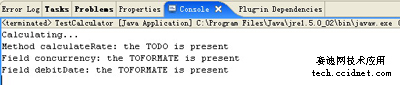
下面我们来运行这个例子,这个例子的运行结果如图10所示。
运行结果和我们先前的定义是一致的。在运行时,我们可以获得注释使用的相关信息。
在我们介绍了什么是注释以后,你可能会想知道注释可以应用到什么地方呢?使用注释有什么好处呢?在下面的小节中我们将介绍一个稍复杂的例子。从这个例子中,你将体会到注释所以提供的强大的描述机制(declarative programming)。
2.3.2 使用注释替代visitor模式
在j2se 5.0以前,我们在设计应用的时候,我们经常会使用visitor这个设计模式。visitor这个模式一般是用于为我们已经设计好了一组类添加方法,而不需要担心改变定义好的类。比如说我们已经定义了好了一组类结构,但是我们希望将这些类的对象部分数据输出到某种格式的文件中。
vistor模式的实现
使用vistor模式,首先我们在employee这个类中加入export方法,export方法如图7所示。export方法接受exporter对象作为参数,并在方法体中调用exporter对象的visit()方法。
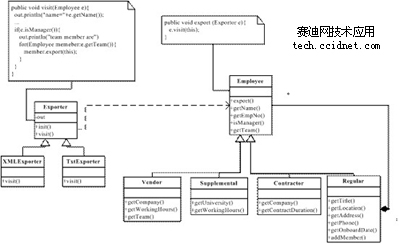
在这里我们定义了一个exporter抽象类,我们可以通过继承exporter类,重写其visit方法来实现不同格式的文件输出。
图7种给出visit方法的实现是一个简单的例子。如果要实现输出成xml格式的,可以定义exporter子类:xmlexporter。如果希望输出成文本的可以定义txtexporter。但是这样做不够灵活的地方在于,如果employee加入其他的域变量,那么相应的visitor类也需要进行修改。这就违反了面向对象open for extension, close for modification的原则。
使用注释替代vistor模式
使用注释(annotation),也可以完成数据输出的功能。首先定义一个新的注释类型:@exportable。然后定义一个抽象的解释器exportablegenerator,将employee 对象传入解释器。
在解释器中,查找哪些域使用了exportable这个注释(annotation),将这些域(field)按照一定格式输出。图12给出了exportable注释的定义。
清单16注释exportable的定义
@target({elementtype.field})
@retention(retentionpolicy.runtime)
@inherited
public @interface exportable {
}
清单17-清单20中给出了包含数据的这些类的定义以及这些类是如何使用注释exportable的。 图18定义了main函数,使用exportergenerator来产生输出文件。清单21给出了使用注释来实现这一功能的两个类:exportergenerator和txtexportergenerator。
其中exportergenerator定义了一个基本的框架。而txtexportergenerator继承了exportergenerator,并且重写了outputfield方法,在这个方法中实现了特定格式的输出。用户可以继承这个exportergenerator,并且实现其中的抽象方法来定义自己期望的格式。
清单17 employee的类定义
public abstract class employee {
public abstract string getname();
public abstract string getempno();
public employee() {
super();
}
}
清单18 regular的类定义
public class regular extends employee{
@exportable string name;
@exportable string address;
@exportable string title;
@exportable string phone;
@exportable string location;
@exportable date onboarddate;
@exportable arraylist team;
string empno;
public regular(string name, string address, string title, string phone,
string location, date date) {
super();
this.name = name;
this.address = address;
this.title = title;
this.phone = phone;
this.location = location;
onboarddate = date;
team = new arraylist();
}
public void addmemeber(employee e){
team.add(e);
}
@override
public string getname() {
// todo auto-generated method stub
return name;
}
}

 闽公网安备 35060202000074号